
Turn Enterprise Data into Intelligence
Connect, combine, model, and analyze data from across your enterprise. AXIS Data Lab brings data composition, insights, reusable data models, and AI-powered Data Agents together in one workspace.
| Entity | Location | Status |
|---|---|---|
| Order A | Dallas | Ready |
| Order B | Chicago | Ready |
| Order C | Atlanta | Review |
From Data Preparation to Intelligence
Build a connected data workflow with tools to prepare information, explore results, structure business data, and apply AI to data-driven tasks.
Data Composer
Combine data from multiple sources into a unified, reusable Dataset through visual composition steps.
- Connect Excel, CSV and databases
- Merge, filter and shape columns
- Configure precedence and join rules
- Preview and reuse saved Datasets
Data Insights
Explore business information and turn prepared data into useful analysis that supports better decisions.
- Explore data and business metrics
- Identify trends and exceptions
- Compare results across datasets
- Support data-driven decisions
Data Models
Organize business information into structured representations that can support consistent analysis and reuse.
- Represent business entities
- Define attributes and relationships
- Structure data for reuse
- Support downstream data workflows
Data Agents
Apply AI-powered agents to business data to help answer questions, investigate results, and support defined tasks.
- Interact with business data
- Investigate questions and exceptions
- Use data as contextual input
- Support intelligent workflows
Bring Multiple Sources into One Dataset
Prepare unified data through a sequence of visual steps. Combine information from files, databases, and other AXIS data sources without having to write the composition logic yourself.
Compose data, one step at a time
Select sources, choose the columns you need, define merge and filtering rules, and preview the output as your composition evolves. Each step can be reviewed, changed, or removed.
- Use multiple AXIS sources in one Dataset, including Excel, CSV and databases.
- Reuse another Dataset as a source to build compositions in layers.
- Configure sheets, file paths, separators, source names and runtime parameters.
- Preview the first N rows or a random sample of N rows to keep large-source previews responsive.
- Save compositions as JSON for review, versioning and reuse.
- More control over How Data Comes Together.
- One Dataset. Multiple Ways to Use It.
Make Business Data Easier to Understand
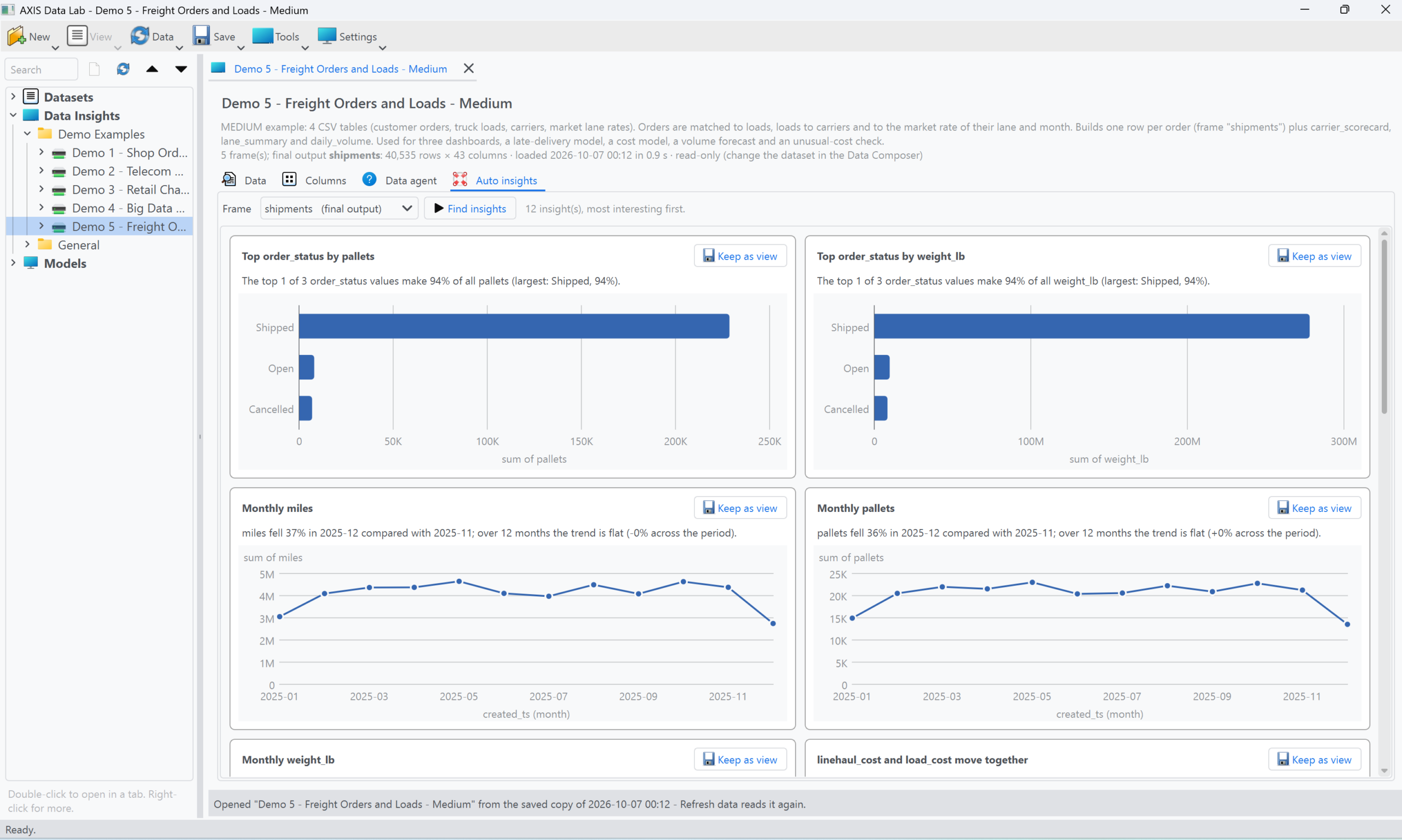
Move from prepared datasets to analysis that helps users understand what is happening in their data. Explore metrics, compare outcomes, and investigate patterns and exceptions.
- Explore structured data through meaningful summaries and visualizations.
- Examine business metrics, trends and variations.
- Identify unusual values or exceptions that need attention.
- Support comparisons across entities, periods or datasets.
- Use prepared data as the foundation for consistent analysis.
Predict What’s Next. Grow Your Business with AI.
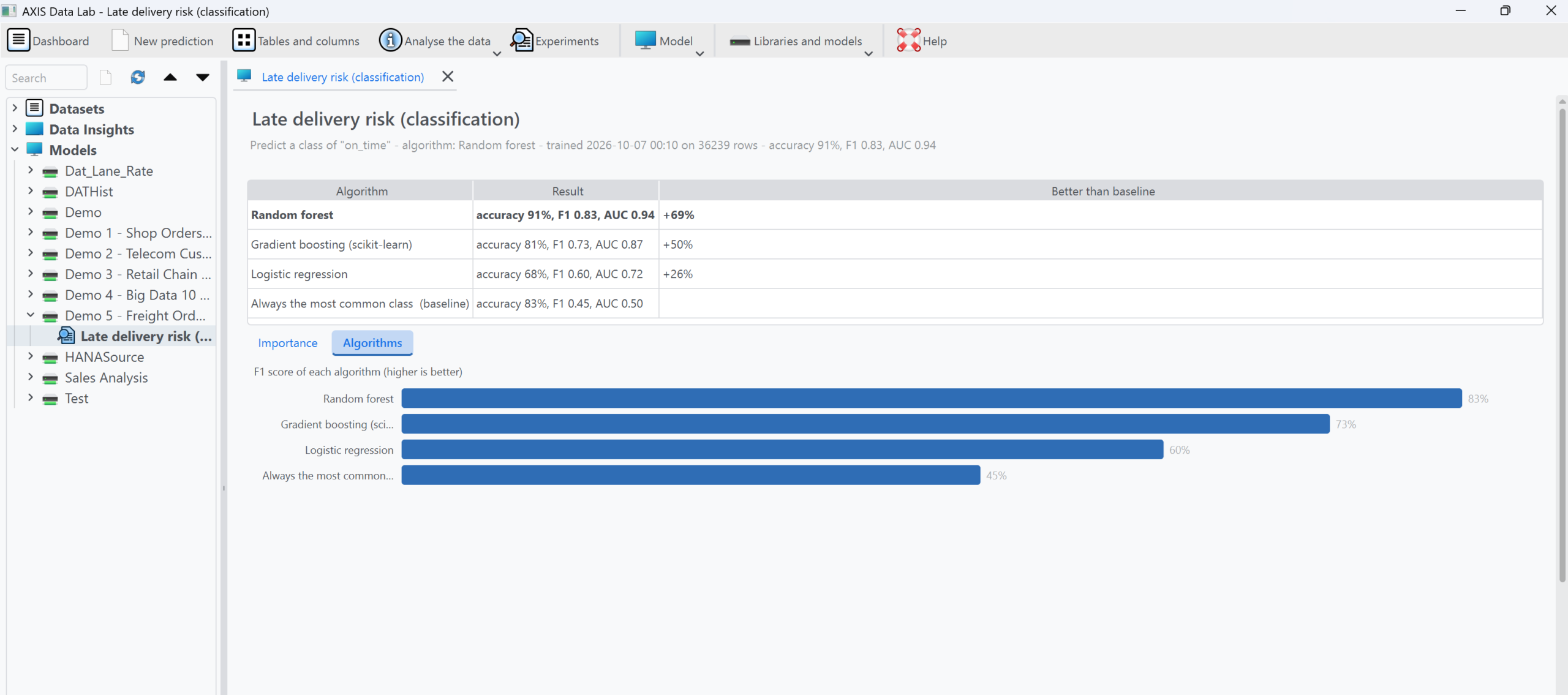
Turn real-time and historical business data into predictive intelligence. Build AI models tailored to your business needs to forecast trends, predict outcomes, identify emerging opportunities, and make smarter, data-driven decisions.
- Develop custom AI models aligned with your business objectives.
- Forecast demand, trends, volumes, and future business outcomes.
- Use real-time and historical data to support predictive analysis.
- Identify patterns, anticipate changes, and uncover business opportunities.
- Continuously refine predictions as new data becomes available, where supported.
Bring AI into Your Data Workflows
Data Agents can provide a more natural way to interact with business information. Use AI-powered experiences to ask questions, examine data, investigate exceptions, and support defined business tasks.
- Use business data as context for supported agent tasks.
- Make it easier to ask questions about prepared information.
- Support investigation of patterns, discrepancies and exceptions.
- Connect data-oriented reasoning with defined workflows where supported.
- Build specialized agents around specific data and business needs.
Review the records flagged by your configured validation rules. Examine the relevant fields and validation results before taking action.
Agent behavior depends on the configured model, available data, permissions and supported tools.
Build on Your Data, Step by Step
Use the capabilities that fit your needs. Prepare datasets, explore the results, structure information, and apply agents where they add value.
Prepare
Combine and transform information into reusable datasets with Data Composer.
Understand
Explore results and investigate trends, metrics and exceptions with Data Insights.
Structure
Represent business information in consistent, reusable data structures with Data Models.
Intelligent Use
Apply Data Agents to supported questions and tasks using available business context.
Make More of Your Data
Bring your sources together, create reusable datasets, explore business information, and discover new possibilities with AI-powered data experiences.